
Recursion and Pagination

Part 1 of 3 in Software Odds and Ends
Introduction

At some point during a client engagement I found myself writing the same while loop for the third time in as many weeks. Not similar code — the same structure. Get a page, append the results, check for an end condition, repeat. One API used page numbers. One used a next link in the response body. One buried its actual data inside a nested values field and indicated completion differently again. Different data sources, different pagination shapes, the same loop.
Eventually I stopped copy-pasting and wrote a function that handles all of them. Three parameters: the initial response, the key to follow for the next page, and the key that extracts the data. Pass those in and it traverses the entire dataset regardless of how the API has decided to structure things. The function uses recursion, which turns out to be the natural fit for this problem.
This post walks through building up to that function. If recursion and pagination are already familiar, skip to the general function. If not, read on.
The goal
By the end of this article, you’ll understand:
- What recursion is and how to identify a base case.
- How REST API pagination works and why it varies between APIs.
- How to write a recursive function that handles pagination across most REST APIs.
- The cases where this approach breaks — and what to reach for instead.
Prerequisites
- Basic Python.
- Familiarity with REST APIs and the
requestslibrary.
Recursion
Recursion is a function calling itself. The trick is knowing when to stop — the base case — and how to combine the results on the way back up.
Fibonacci makes this concrete. Starting with the iterative version:
def fibonacci(number: int) -> int:
    if number < 2:
        return number
    first = 0
    second = 1
    for i in range(3, number):
        third = first + second
        first = second
        second = third
    return third
The recursive version expresses the same logic more directly. Two questions get you there:
- What can be answered with absolute finality, without knowing anything else? That’s the base case.
- Knowing the base case, how does the full answer build from smaller answers?
For Fibonacci, the base case is any number less than 2 — return it directly. Every other number is the sum of the two before it. That gives:
def fibonacci(number: int) -> int:
    if number < 2:
        return number
    return fibonacci(number - 1) + fibonacci(number - 2)
The execution path descends to the base case, then unwinds:
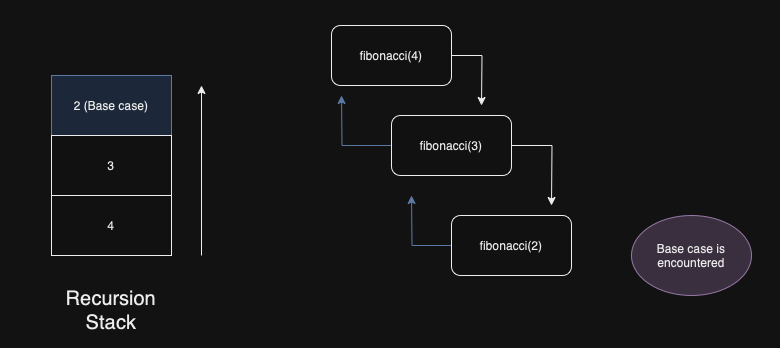
The trade-off is stack depth. Each recursive call occupies a stack frame; deep recursion means a tall stack. This is manageable for small inputs but becomes a problem at scale.
Python’s default recursion limit is 1000 calls deep, and Guido van Rossum has been explicit that this is intentional — tail recursion elimination is not coming. The Fibonacci example above is for illustration. Don’t use it to calculate the hundred-thousandth sequence number.
For API pagination the recursion depth is bounded by the number of pages, which is usually well within limits. A dataset with 50,000 records at 100 per page is 500 calls — fine. A dataset with 100,000 pages would not be.
Pagination
Pagination divides a large dataset into discrete pages — each page a finite chunk, with some mechanism to navigate from one to the next.
The book analogy holds. Terry Pratchett’s The Colour of Magic isn’t printed on one scroll. It’s split into pages of a fixed size, each numbered, with a physical mechanism (turning the page) to get from one to the next. Reading it is a simple algorithm: read the current page, turn to the next, repeat until there are no more pages.
REST APIs work the same way. If an endpoint can return thousands of records, returning all of them in one response is expensive and unwieldy for the client. So the API paginates: each response contains a page of results and some indicator of how to get the next one.
OpenBreweryDB uses the simplest form — explicit page numbers via a ?page= query parameter. Fetching five breweries from page one:
curl 'https://api.openbrewerydb.org/v1/breweries?per_page=5&page=1'To get everything, iterate until a page comes back empty:
from typing import List
from requests import Session

base_url = "https://api.openbrewerydb.org/v1/breweries?by_type=closed&per_page=20"
session = Session()

def query_api(url: str, session: Session) -> List[dict]:
    return_list = []
    page = 1
    while True:
        response = session.get(f"{url}&page={page}")
        if not response.ok or len(response.json()) == 0:
            break
        return_list.extend(response.json())
        page += 1
    return return_list

print(len(query_api(url=base_url, session=session)))  # 163 closed breweries
A recursive refactor
The while loop above works but mixes the base case (empty or failed response) with the accumulation logic. Framed as recursion:
- Base case: the response is empty or failed — return an empty list.
- Recursive case: return this page’s results plus whatever the next page returns.
def query_api(url: str, page: int, session: Session) -> List[dict]:
    response = session.get(url=f"{url}&page={page}")
    if not response.ok or len(response.json()) == 0:
        return []
    return response.json() + query_api(url=url, page=page + 1, session=session)

print(len(query_api(url=base_url, page=1, session=session)))  # 163
The base case and the recursive step are both visible at a glance.
This works for any API that paginates via an explicit ?page= parameter and returns a flat list. That’s a start, but most APIs don’t do that.
Bringing it together
The brewery API is the simplest case. Most REST APIs I’ve encountered in client work follow a different shape: the response body contains the data nested under a field name (like values or items), and includes a next key pointing to the URL for the next page. When there are no more pages, next is absent from the response.
The three-parameter function came out of handling Bitbucket first, then noticing that GitHub and several others followed close enough to the same pattern that a single abstraction covered them all:
from typing import List, Union
import requests

def paginate_response(
    response: requests.models.Response,
    next_page: str,
    base_field: Union[str, None],
    client: requests.Session,
) -> List[dict]:
    """
    Recursively traverse a paginated REST API response.

    :param response: The initial response from the API.
    :param next_page: The key in the response body that holds the next page URL.
    :param base_field: The key that holds the list of results, or None if the response is a flat list.
    :param client: The session to use for subsequent requests (preserves auth headers etc.).
    :return: All results across all pages as a flat list of dicts.
    """
    response_dict = response.json()
    current_page = response_dict if base_field is None else response_dict[base_field]
    if next_page not in response_dict:
        return current_page
    return current_page + paginate_response(
        response=client.get(url=response_dict[next_page]),
        next_page=next_page,
        base_field=base_field,
        client=client,
    )
The base_field parameter handles the difference between APIs that return a flat list ([{...}, {...}]) and those that wrap results in a named field ({"values": [{...}], "next": "..."}). Setting it to None handles the flat case.
The next_page parameter is the key to check for in the response body. When it’s absent, recursion stops — that’s the base case. This makes the function work for APIs that don’t paginate at all: the key is never present, so the function returns the single response and exits.
Example: Bitbucket
Bitbucket returns results under values and includes a next link when more pages exist:
workspace = "<ORG>"
base_url = "https://api.bitbucket.org/2.0"
client = requests.Session()
client.headers.update({
    "Authorization": "Bearer <TOKEN>",
    "Accept": "application/json",
})

repositories = paginate_response(
    response=client.get(url=f"{base_url}/repositories/{workspace}"),
    next_page="next",
    base_field="values",
    client=client,
)
Example: GitHub
GitHub’s /user/repos endpoint returns a flat list. With base_field=None, the function treats the response body directly as the page of results:
client = requests.Session()
client.headers.update({
    "Authorization": "Bearer <TOKEN>",
    "Accept": "application/vnd.github+json",
    "X-GitHub-Api-Version": "2022-11-28",
})

repositories = paginate_response(
    response=client.get(url="https://api.github.com/user/repos"),
    next_page="next",
    base_field=None,
    client=client,
)
Example: D&D 5e
The D&D 5e API doesn’t paginate at all — it returns everything in one response. Because next is never present, the base case fires immediately and the full spell list comes back in one call:
client = requests.Session()
client.headers.update({"Accept": "application/json"})

spells = paginate_response(
    response=client.get(url="https://www.dnd5eapi.co/api/spells"),
    next_page="next",
    base_field=None,
    client=client,
)
Where this breaks
This function covers the pattern well. It doesn’t cover everything.
Boto3 has its own pagination abstraction — AWS services use it consistently and it’s worth using directly rather than wrapping.
TeamCity’s REST API paginates via start and count integer offsets in the response body rather than a next URL. You’d need to adapt the function to increment an offset rather than follow a link.
Header-based pagination (GitHub’s Link header is the common example) puts the next URL in the response headers rather than the body. The function doesn’t touch headers at all — you’d need a different approach.
Deeply nested responses are the worst case. Some AWS and Microsoft APIs bury their data and their pagination signals at different depths in the response. When the data and the next key aren’t at the same level in the JSON, base_field stops being enough — you’d need a path expression or just write something specific to that API.
For everything else — APIs that return a body with data and a next link at the top level — this works.
Conclusion
The function is small enough to inline anywhere, general enough to cover most standard REST APIs, and honest about its constraints. It came out of noticing that the same while loop kept appearing across different client integrations. Once the pattern was visible, making it a function was obvious.
Add logging and error handling before using it in production. Don’t assume the recursion depth is always safe — check the page count for whatever dataset you’re hitting. And if you’re working with AWS or TeamCity, use their native pagination tools rather than bending this one to fit.
Further Reading:
- Boto3 Paginators — AWS’s built-in pagination abstraction
- GitHub REST API pagination — Link header pagination in detail
- OpenBreweryDB API — the example API used in this post
- D&D 5e API — for when you need all 319 spells at once
Part 1 of 3 in Software Odds and Ends