
Event-Driven Vision Inference with Bedrock, Pydantic, and Parquet

Part 1 of 3 in AI Vision Inference
Introduction
I gave a demo at a Manchester tech meetup recently — book covers fed into a live pipeline, metadata extracted by Bedrock, queryable via SQL within seconds. The reaction when the first inference came back was the moment that made it feel real: title, author, ISBN, confidence score, all pulled from a JPEG by an API call and a Pydantic model.
What the demo didn’t show was how I got there. A few months earlier I’d been trying to run vision inference locally using LMStudio. The idea was sensible — local model, no API costs, full control — but my hardware disagreed. The images were slow, the output was inconsistent, and I was spending more time fighting the setup than building the actual pipeline. When I gave up on local inference, Sudoblark already had an enterprise AWS setup, so Bedrock was the natural next step.
It turned out to be the right call in more ways than one. I built the bookshelf demo as a side project — part learning exercise, part experiment to see what a production-grade inference pipeline looked like when you used Bedrock properly. Clients were starting to ask about integrating AI into their services, and I wanted real implementation experience before doing it on someone else’s production data. That bet has paid off. I’m now engaged with a supply-chain consultancy building out an AI inference platform, and a significant portion of the Lambda code from the bookshelf demo translated directly into that engagement.
This post walks through the pattern. Event-driven serverless architecture applied to vision inference: S3 events trigger Lambda, Lambda calls Bedrock, Pydantic validates the response, Parquet lands in S3 for Athena. It’s not specialised ML infrastructure — it’s the same pattern platform engineers already use for document processing, file transformation, and API webhooks. The only new thing is the API being called.
The goal
Within this blog post, I aim to:
- Show the serverless event-driven pattern for vision inference — and why it doesn’t require specialised ML infrastructure
- Walk through the Bedrock integration: prompt design, image preprocessing, and three-stage response parsing
- Explain why Pydantic validation matters for AI output quality, including what it catches and what it can’t
- Cover Parquet storage for analytics-ready data with no transformation pipeline
- Share real implementation code from the bookshelf demo
The complete working code is here: sudoblark.ai.bookshelf-demo
Prerequisites
I’m assuming familiarity with:
- Python and object-oriented programming
- Serverless patterns (Lambda, S3 events)
- AWS services (basic familiarity)
- Data formats (JSON, Parquet)
If not, here are some starting points:
Python & AWS Lambda
AWS Bedrock
Parquet & Analytics
The Pattern
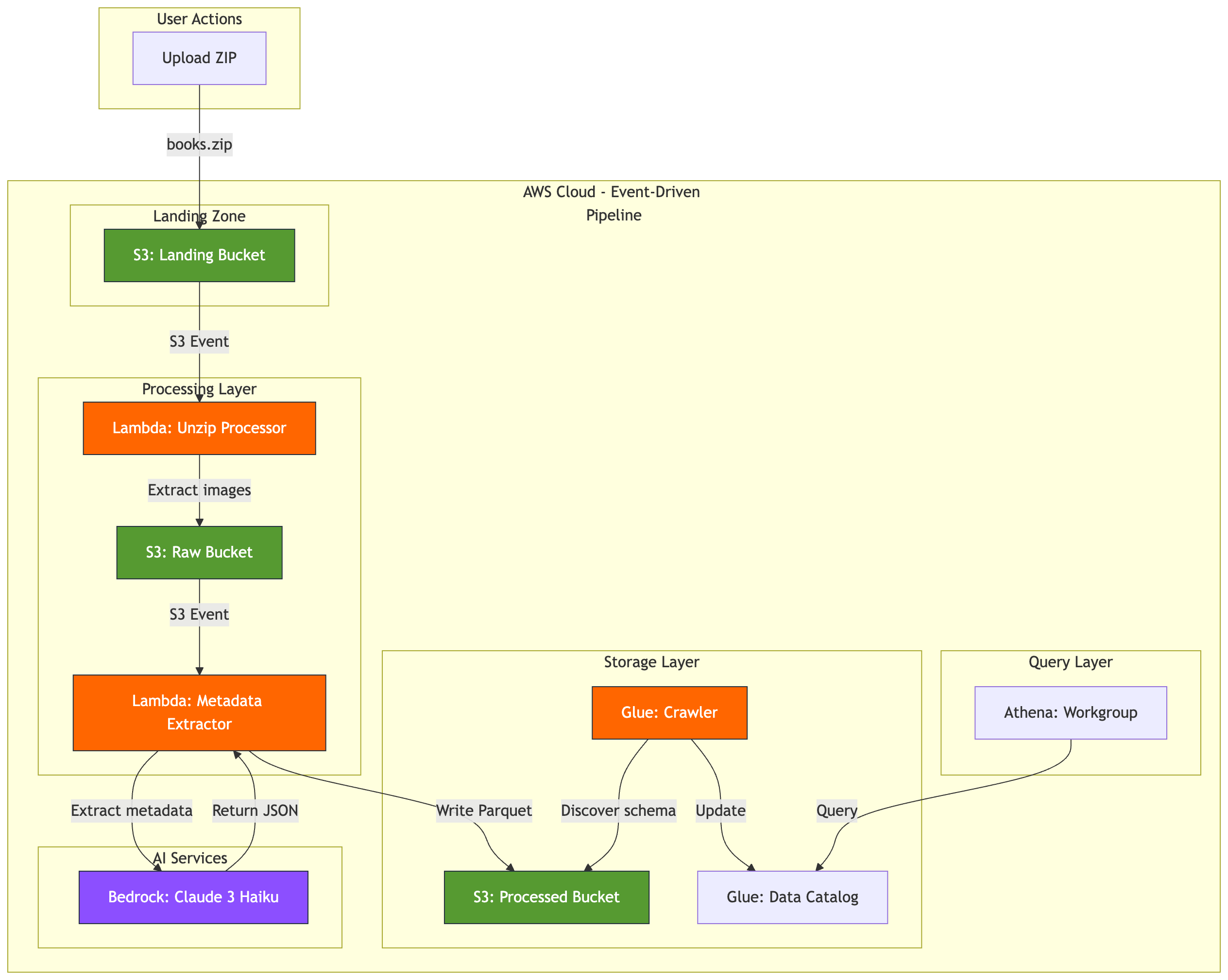
Here’s the architecture from the bookshelf demo:
graph TB
    subgraph "User Actions"
        A[Upload ZIP]
    end

    subgraph "AWS Cloud - Event-Driven Pipeline"
        subgraph "Landing Zone"
            B[S3: Landing Bucket]
        end

        subgraph "Processing Layer"
            C[Lambda: Unzip Processor]
            D[S3: Raw Bucket]
            E[Lambda: Metadata Extractor]
        end

        subgraph "Storage Layer"
            F[S3: Processed Bucket]
            G[Glue: Crawler]
            H[Glue: Data Catalog]
        end

        subgraph "Query Layer"
            I[Athena: Workgroup]
        end

        subgraph "AI Services"
            J[Bedrock: Claude 3 Haiku]
        end
    end

    A -->|books.zip| B
    B -->|S3 Event| C
    C -->|Extract images| D
    D -->|S3 Event| E
    E -->|Extract metadata| J
    J -->|Return JSON| E
    E -->|Write Parquet| F
    G -->|Discover schema| F
    G -->|Update| H
    I -->|Query| H

    classDef storage fill:#569A31,stroke:#232F3E,color:#fff
    classDef compute fill:#FF6600,stroke:#232F3E,color:#fff
    classDef ai fill:#8C4FFF,stroke:#232F3E,color:#fff

    class B,D,F storage
    class C,E,G compute
    class J ai
This isn’t a specialised ML pipeline. It’s standard serverless infrastructure with an AI service call in the middle. S3 events trigger Lambda. Lambda calls an API — Bedrock instead of, say, a payment gateway. Results get validated and written to S3. Glue catalogs the schema. Athena queries it.
The whole thing maps to patterns platform engineers already operate. There’s no model serving, no GPU instances, no ML ops tooling. Adding Bedrock to an existing Lambda workflow is one boto3 client import and a slightly unusual request body format.
Component breakdown
The S3 Landing Bucket uses ObjectCreated event notifications to trigger the first Lambda. Nothing vision-specific — it’s the same S3 event pattern used for any file ingestion.
The Lambda Unzip Processor extracts images from the uploaded ZIP and writes them to the Raw bucket. Each image triggers the next stage independently — ten images means ten concurrent Lambda invocations, natural parallelism with no orchestration needed.
The Lambda Metadata Extractor is the core of the pipeline. It downloads the image, resizes it to 1024px maximum dimension (Bedrock’s image limit), base64-encodes it for the API, calls Bedrock with a structured prompt, validates the response with Pydantic, and writes Parquet to the Processed bucket. Dependencies are Pillow, Pydantic, and PyArrow — no ML libraries anywhere.
Bedrock Claude 3 Haiku is a multimodal model accepting images and text prompts. It returns JSON with extracted metadata, charged per token, with no infrastructure to manage — it’s an API call.
The Pydantic validation layer is where data quality actually happens. More on this shortly.
Parquet + Glue + Athena handles the storage and query layer: columnar files with Hive-style year/month/day partitioning, a Glue crawler that discovers new partitions on a schedule, and Athena queries that scan only the partitions they need.
What you’re not building: training pipelines, model serving infrastructure, feature stores, ML ops tooling, GPU instances. No SageMaker endpoints, no CUDA drivers, no labelled datasets. You’re using a managed AI service the same way you’d use a managed database or message queue.
Bedrock Implementation
Let’s look at the actual code from the metadata extractor Lambda.
Lambda handler structure
The entry point follows standard S3 event patterns with AWS Lambda Powertools:
from aws_lambda_powertools.utilities.data_classes import S3Event, event_source

@event_source(data_class=S3Event)
def handler(event: S3Event, context: Any) -> Dict[str, Any]:
    config = get_config()
    processed_files = []
    failed_files = []

    for record in event.records:
        try:
            bucket_name = record.s3.bucket.name
            object_key = record.s3.get_object.key
            parquet_key = process_image_to_parquet(bucket_name, object_key, config)
            processed_files.append(parquet_key)
        except Exception as e:
            failed_files.append({"key": object_key, "error": str(e)})

    return {
        "statusCode": 200 if not failed_files else 207,
        "processed_count": len(processed_files),
        "failed_count": len(failed_files),
    }
Nothing exotic. S3 event parsing, error handling, batch processing. The same structure used for log processing or file transformation — Bedrock is just a different API to call inside the loop.
Image preprocessing
Bedrock has image size limits. Images get resized and converted to JPEG before the API call:
def resize_image_to_jpeg(image_bytes: bytes, max_dim: int = 1024, quality: int = 90) -> bytes:
    """Resize image to fit within max_dim x max_dim and convert to JPEG."""

    with Image.open(io.BytesIO(image_bytes)) as original_img:
        rgb_img = original_img.convert("RGB")
        rgb_img.thumbnail((max_dim, max_dim), Image.Resampling.LANCZOS)

        buffer = io.BytesIO()
        rgb_img.save(buffer, format="JPEG", quality=quality)
        return buffer.getvalue()
Converting to RGB handles PNG transparency. Resizing to 1024px also matters for cost — Bedrock charges per token, and larger images mean more tokens. The resized image then gets base64-encoded for the API.
The Bedrock API call
def extract_metadata_with_bedrock(image_bytes: bytes, filename: str, model_id: str) -> Dict[str, Any]:
    """Extract book metadata from image using AWS Bedrock."""

    resized_image_bytes = resize_image_to_jpeg(image_bytes, max_dim=1024)
    image_base64 = base64.b64encode(resized_image_bytes).decode("utf-8")

    request_body = {
        "anthropic_version": "bedrock-2023-05-31",
        "max_tokens": 1024,
        "messages": [
            {
                "role": "user",
                "content": [
                    {
                        "type": "image",
                        "source": {
                            "type": "base64",
                            "media_type": "image/jpeg",
                            "data": image_base64,
                        },
                    },
                    {"type": "text", "text": METADATA_EXTRACTION_PROMPT},
                ],
            }
        ],
    }

    response = bedrock_client.invoke_model(
        modelId=model_id,
        body=json.dumps(request_body)
    )

    response_body = json.loads(response["body"].read())
    response_text = response_body["content"][0]["text"]

    return parse_bedrock_response(response_text)
The request format follows Anthropic’s Messages API. The content array includes both the image and the text prompt. Bedrock returns text — and trusting that text directly is where production pipelines break.
Prompt engineering for structured output
The prompt explicitly demands JSON-only output. No markdown wrappers, no explanatory text:
METADATA_EXTRACTION_PROMPT = """Extract metadata from this book cover image
and return ONLY a valid JSON object.

CRITICAL: Your response must be ONLY the JSON object - no markdown, no code
blocks, no explanation text.

Required JSON format:
{
  "title": "book title here",
  "author": "author name here",
  "isbn": "digits only, no hyphens",
  "publisher": "publisher name here",
  "published_year": 2024,
  "description": "brief description here",
  "confidence": <see rules below>
}

Rules:
- isbn: digits only (strip hyphens/spaces), use "" if not found
- published_year: integer (e.g., 2024) or null if not found
- confidence: YOUR assessment as float 0.0-1.0 based on text visibility:
  * 0.9-1.0: All text clearly visible, high certainty on all fields
  * 0.7-0.9: Most fields visible but some text unclear or partially obscured
  * 0.5-0.7: Several fields missing or text quality poor
  * 0.0-0.5: Very poor image quality, most fields are guesses
- Empty values: use "" for unknown strings, null for unknown year/confidence

Return ONLY the JSON object."""
An earlier version of this prompt included an example: "confidence": 0.95. The model copied that value for every single image, regardless of actual quality. I removed the example and replaced it with ranges. Confidence scores now vary based on actual image quality — 0.62 for a blurry cover, 0.88 for a clean one, 0.71 for one with partial text obscured.
Confidence scores tell you whether the model could read the text. They don’t tell you whether it interpreted it correctly. That distinction matters — more on it in the next section.
Three-stage response parsing
Bedrock returns text. That text should be JSON, but you can’t trust it:
def parse_bedrock_response(response_text: str) -> Dict[str, Any]:
    """Parse Bedrock response with Pydantic validation."""

    try:
        # Stage 1: Try direct JSON parse
        parsed = json.loads(response_text.strip())
        validated_metadata = BookMetadata(**parsed)
        return validated_metadata.model_dump()

    except json.JSONDecodeError:
        # Stage 2: Extract JSON from markdown wrapper
        start = response_text.find("{")
        end = response_text.rfind("}") + 1
        if start >= 0 and end > start:
            json_str = response_text[start:end]
            parsed_fallback = json.loads(json_str)
            validated_fallback = BookMetadata(**parsed_fallback)
            return validated_fallback.model_dump()

    except Exception:
        pass

    # Stage 3: Return validated empty metadata
    default_metadata = BookMetadata()
    return default_metadata.model_dump()
Stage 1: Direct JSON parse. Stage 2: Strip markdown wrappers — handles responses where the model wraps the JSON in a code block despite being told not to — and try again. Stage 3: Return a Pydantic-validated empty object with null fields. Downstream systems receive valid schema even when inference fails entirely. Each stage validates through Pydantic before returning.
Data Quality with Pydantic
After fixing the confidence uniformity problem, I started getting realistic scores from the model. I also got a result confidently telling me that Barack Obama wrote Fahrenheit 451.
He didn’t. The cover had a “Foreword by Barack Obama” blurb. The model read the text, found a name, and assigned it to the author field. Confidence: 0.88 — because the text was clearly visible. High confidence, wrong interpretation.
This is the honest limit of Pydantic validation: it catches format problems, not semantic ones. The Barack Obama attribution came back with a perfectly valid schema. Well-formed JSON, correct types, confidence score in range. Pydantic passed it. What it can’t do is know that a foreword attribution isn’t the author.
What Pydantic does prevent is a different and more insidious class of problems.
The Pydantic model
Here’s the complete validation schema from the bookshelf demo:
from pydantic import BaseModel, Field, field_validator

class BookMetadata(BaseModel):
    """Pydantic model for book metadata extracted from covers."""

    title: str = Field(default="", description="Book title")
    author: str = Field(default="", description="Author name(s)")
    isbn: str = Field(default="", description="ISBN (digits only, no hyphens)")
    publisher: str = Field(default="", description="Publisher name")
    published_year: Optional[int] = Field(default=None, description="Year of publication")
    description: str = Field(default="", description="Brief book description")
    confidence: Optional[float] = Field(
        default=None,
        ge=0.0,
        le=1.0,
        description="AI extraction confidence (0.0-1.0)",
    )

    @field_validator("isbn")
    @classmethod
    def validate_isbn(cls, v: str) -> str:
        """Remove hyphens and spaces from ISBN."""
        if v:
            return v.replace("-", "").replace(" ", "")
        return v

    @field_validator("published_year")
    @classmethod
    def validate_year(cls, v: Optional[int]) -> Optional[int]:
        """Validate year is reasonable."""
        if v is not None and (v < 1000 or v > 2100):
            return None
        return v
ISBN normalisation: The model returns ISBNs inconsistently — "978-0-7432-7356-5" one run, "9780743273565" the next. Without normalisation, the same book shows up as two different records in any WHERE isbn = '...' query. The validator strips hyphens and spaces on every extraction.
Year range validation: Book covers without a visible publication year sometimes produce hallucinated values — 9999, 0, or the current year as a guess. Years below 1000 or above 2100 get set to None. Your time-series charts don’t spike.
Confidence bounds: ge=0.0, le=1.0. If the model returns 1.5 (it occasionally does), Pydantic raises a validation error. The fallback logic in parse_bedrock_response catches this and returns empty metadata with null fields. Parquet gets written, downstream SQL doesn’t fail.
Type coercion: Bedrock sometimes returns "published_year": "2024" as a string. Pydantic coerces it to integer automatically. Your Parquet schema expects int64 — Pydantic guarantees that’s what arrives.
Validation vs. confidence
The Barack Obama example is worth keeping in mind when you use this pattern. Filtering WHERE confidence > 0.8 in Athena gets you extractions where the text was clearly legible. It doesn’t filter out cases where the model misread context.
For the bookshelf demo, that’s acceptable — I can spot-check results and catch obvious misattributions. For a production system where correctness matters (invoice processing, document parsing, anything with compliance implications), you’d want a human review queue for low-confidence records and periodic sampling of high-confidence ones.
Pydantic prevents silent data corruption. It doesn’t solve LLM hallucination. Knowing which problem you’re solving with which tool is what makes the difference between a pipeline that works and one that fails quietly.
Parquet Storage for Analytics
JSON in S3 is the path of least resistance for Lambda outputs. It’s easy to write, easy to debug, and has no dependencies beyond the standard library. It’s also a poor analytics format: every Athena query scans entire files, types drift over time as prompts change, and there’s no schema enforcement. A published_year that starts as an integer becomes a string three months later when someone adjusts the prompt — and the aggregation that was working breaks silently.
Parquet solves most of this: columnar storage means queries read only the fields they need, built-in compression handles repeated values efficiently, and schema is enforced at write time. The reason I chose it for the bookshelf demo was simpler than any of that: Parquet is portable. It works identically on AWS (Athena), GCP (BigQuery), and Azure (Synapse). When the pattern translates to client work — as it has for me — the data layer comes with it, no re-engineering required.
Writing Parquet from Lambda
Here’s the complete function from the bookshelf demo:
def write_metadata_to_parquet(metadata: Dict[str, Any], processed_bucket: str) -> str:
    """Convert metadata to Parquet format and upload to S3."""

    df = pd.DataFrame([metadata])

    now = datetime.utcnow()
    year = now.strftime("%Y")
    month = now.strftime("%m")
    day = now.strftime("%d")
    timestamp = now.strftime("%Y%m%d_%H%M%S")
    parquet_key = (
        f"processed/year={year}/month={month}/day={day}/"
        f"metadata_{timestamp}_{metadata['id']}.parquet"
    )

    parquet_buffer = io.BytesIO()
    df.to_parquet(parquet_buffer, index=False, engine="pyarrow")
    parquet_bytes = parquet_buffer.getvalue()

    s3_client.put_object(
        Bucket=processed_bucket,
        Key=parquet_key,
        Body=parquet_bytes,
        ContentType="application/octet-stream",
    )

    return parquet_key
Pandas DataFrame converts the validated dictionary to Parquet. PyArrow handles the columnar encoding and compression. Everything stays in memory — no disk I/O in Lambda. For a single metadata record (~500 bytes of JSON), the Parquet file is 1–2KB compressed.
Partitioning strategy
The S3 path uses Hive-style partitions:
s3://bucket/processed/year=2026/month=03/day=09/metadata_20260309_150530_uuid.parquetAthena partition pruning uses this structure. A query filtering on year=2026 AND month=03 scans only that month’s data — roughly 1/12th of the total if you have a year’s worth. The partitioning also maps naturally to data lifecycle: S3 lifecycle policies can delete old partitions without any application-level logic.
Schema discovery with Glue
The Glue crawler runs daily and discovers new partitions automatically:
resource "aws_glue_crawler" "metadata" {
  name          = "bookshelf-metadata-crawler"
  database_name = aws_glue_catalog_database.main.name
  role          = aws_iam_role.glue_crawler.arn

  s3_target {
    path = "s3://${aws_s3_bucket.processed.bucket}/processed/"
  }

  schedule = "cron(0 2 * * ? *)"  # Daily at 2 AM UTC
}
Data written today is queryable after the next crawler run. No manual ALTER TABLE ADD PARTITION statements. For near-real-time requirements, trigger the crawler via EventBridge immediately after Lambda writes a file — the pattern scales either way.
Production Considerations
The bookshelf demo runs on intermittent workloads — a ZIP of images uploaded occasionally. The full pipeline for the meetup demo (40 images: Lambda preprocessing, Bedrock inference, Pydantic validation, Parquet storage, Glue, Athena) cost roughly £0.05, though that’s an approximation rather than a tracked spend. The main cost is Bedrock API calls (~£0.014 for 40 images at Claude 3 Haiku pricing), Lambda execution is negligible, and S3 storage at this scale is fractions of a penny. Scale those numbers up: £1.25–£2 per 1,000 images is a reasonable working estimate, depending on image size and retry rates.
Model selection matters more than any other optimisation. Claude 3 Haiku costs roughly 12x less than Claude 3 Sonnet for this workload. For structured metadata extraction from book covers, Haiku accuracy was sufficient — and any accuracy gap is narrow enough that it doesn’t justify the cost difference. Resizing images to 1024px before sending them reduces input tokens (and therefore cost) with no extraction quality loss; Bedrock doesn’t benefit from higher resolution than that.
Error handling
Bedrock throttles requests when you exceed quotas. The default quota for Claude 3 Haiku in eu-west-1 is 40 requests per minute. If you upload 500 images at once, Lambda processes them concurrently and hits that limit immediately. Configure adaptive retries on the boto3 client:
from botocore.config import Config

bedrock_client = boto3.client('bedrock-runtime', config=Config(
    retries={'max_attempts': 3, 'mode': 'adaptive'}
))
Adaptive mode uses exponential backoff plus token-bucket throttle detection. Three attempts with backoff handles most transient quota issues. For persistent failures, configure a dead letter queue (DLQ) on the Lambda function so failed S3 events land in SQS rather than disappearing:
resource "aws_lambda_function" "metadata_extractor" {
  # ... other config ...

  dead_letter_config {
    target_arn = aws_sqs_queue.processing_failures.arn
  }
}
Set a CloudWatch alarm when DLQ depth exceeds 10 — that indicates a systemic problem rather than transient throttling.
Monitoring
Key signals to track via CloudWatch:
- Average Bedrock latency per hour — most of your total processing time (80%+) is here
- Confidence score distribution — sudden shifts indicate prompt drift or a model update
- Validation failure rates — spikes suggest the model is returning malformed responses
logger.info(f"Bedrock latency: {duration_ms}ms, confidence: {metadata['confidence']}")

if metadata.get('confidence', 0) < 0.5:
    logger.warning(f"Low confidence extraction: {object_key} (score: {metadata['confidence']})")
CloudWatch Logs Insights queries handle this at the bookshelf scale. For production systems with real volume, a dashboard over these metrics is worth the setup time.
Security
The Lambda execution role needs exactly four permissions: bedrock:InvokeModel on the specific model ARN, s3:GetObject on the raw bucket, s3:PutObject on the processed bucket, and CloudWatch Logs write access. Nothing else. Scope the Bedrock permission to the specific model ARN, not bedrock:*.
Validate S3 object keys before processing to reject path traversal attempts — even though S3 events come from a trusted source, defensive validation costs nothing:
def is_valid_image_key(key: str) -> bool:
    """Validate S3 key is safe to process."""
    if '..' in key or key.startswith('/'):
        return False
    allowed_extensions = {'.jpg', '.jpeg', '.png'}
    return any(key.lower().endswith(ext) for ext in allowed_extensions)
When this pattern doesn’t fit
Real-time requirements (sub-100ms latency): Lambda cold starts plus Bedrock API latency puts you at 3–5 seconds per image. Live camera feeds or synchronous UI responses need a different architecture — a dedicated inference endpoint with pre-loaded models.
High-volume constant workloads: at millions of images per day, AWS Batch on Spot instances is significantly cheaper than Lambda per-invocation pricing. The event-driven pattern is well-suited to sporadic workloads, not sustained high-throughput batch jobs.
This pattern does inference against pre-trained models — it doesn’t train or fine-tune. If your use case needs custom model training, SageMaker or Vertex AI training jobs are the right tool.
Conclusion
The bookshelf demo is live at sudoblark.ai.bookshelf-demo. Clone it, point it at your AWS account, swap the prompt and Pydantic schema for your use case — invoice OCR, product image classification, document parsing — and the architecture is the same. S3 events, Lambda, Bedrock, Pydantic, Parquet. The only thing that changes is what you’re asking the model to extract.
It’s also actively evolving. The bookshelf demo started as a meetup demo, became the foundation for a supply-chain inference platform engagement, and is now the first post in a series where I’m building a full end-to-end agentic system — in the open, writing about the decisions as I go. The next post covers a refactor to pydantic-ai, which changes how the validation and inference layers interact in ways that become more significant as the system gets more complex.
The pattern here — event-driven serverless, managed AI service, Pydantic validation, Parquet storage — is the foundation. Everything I build from here sits on top of it. If you want to follow that build, the repo is the best place to watch. If you’re trying to get a similar inference pipeline running at a client and want to skip the experimentation phase, get in touch.
Part 1 of 3 in AI Vision Inference