
Rebuilding the Bookshelf: From Lambda Pipeline to Streaming Agent

Part 3 of 3 in AI Vision Inference
Introduction
Earlier this year I was invited to speak at AWS User Group Lancaster. The organiser had seen the AI Vision Inference talk I gave at DevOps Society and wanted me to come along with something similar. The timing was good: the client engagement that spawned that first talk had moved on considerably, and I was learning a lot from it that I hadn’t had chance to share properly. I wanted the AWS User Group talk to be better than the DevOps Society one — which meant pushing the demo further.
The client work is a digital twin system for a supply-chain consultancy. Part of that system is a chat interface that accepts any uploaded data, interrogates it, and confirms what kind of supply-chain data it is. To handle files of arbitrary size, the interface uses an S3 toolset that reads in chunks, with the model synthesising those chunks into an understanding of the data’s structure and business context. In staging, with larger files, we hit a wall: the reasoning over those chunks took longer than Lambda’s API Gateway timeout. The pragmatic fix was to cap the toolset at one chunk and deprioritise the streaming work. But I wanted to understand that architectural problem properly before it got picked up again — so I used the bookshelf demo to explore it, rather than wait for the client to reprioritise it.
The result is release 2.0.0: the Lambda pipeline replaced with a FastAPI container, agent output streamed via Server-Sent Events (SSE), and the event-driven patterns from post 1 and post 2 kept intact. This post covers the architectural shift and the lessons that came out of building it.
The goal
This post covers:
- Why Lambda’s request/response model is structurally incompatible with SSE streaming
- How uploads go directly from the browser to S3 via presigned URLs, with no binary data routing through the API
- How DynamoDB tracks every upload through its pipeline stages, giving visibility into what the agent is doing and where things fail
- A lightweight frontend built to make the demo usable without a technical setup — and to give conference talks an actual interface to show
- An ops dashboard that surfaces those pipeline stages visually, so failed extractions and abandoned sessions are immediately obvious
Prerequisites
I’m assuming familiarity with AWS Lambda, basic FastAPI, and SSE at a conceptual level. The first two posts in this series provide the before-state for the architecture shift covered here.
Lambdas and Streaming
What Lambda can do well
Lambda is cheap serverless compute — a fundamental primitive for cloud-native workloads that has been around long enough to be operationally straightforward. Spinning up a Lambda function means writing business logic and not much else; the runtime, scaling, and infrastructure concerns are handled. For event-driven systems in particular, AWS has built a rich ecosystem around it: S3 events, SQS queues, DynamoDB streams, EventBridge rules — all of them can trigger a Lambda without any additional plumbing.
For the 1.1.0 bookshelf pipeline, Lambda was the natural starting point. An image lands in S3, a function triggers, Bedrock runs inference, the result gets written out. That shape of work — discrete, bounded, triggered by an event — is exactly what Lambda is designed for. In production I’d still reach for Lambda as the default API backend for the vast majority of routes. The operational simplicity alone justifies it: no containers to manage, no idle compute to pay for, and a deployment model that lets a one-person consultancy move quickly without accumulating infrastructure debt.
Why Lambda finds it difficult to stream
Lambda’s 15-minute execution timeout is generous enough for an agent conversation; the constraint is the response model. When Lambda sits behind API Gateway (the standard setup for HTTP APIs), API Gateway buffers the entire response before returning it to the client. There’s no mechanism for a function to push partial output while it’s still running. Lambda Function URLs introduced some streaming support via InvokeWithResponseStream, but it requires specific runtime configuration, carries payload limits, and doesn’t provide the clean persistent HTTP connection that SSE clients need.
At the supply-chain client, this showed up concretely. The chat interface used an S3 toolset to read ingested files in chunks, with the model reasoning across those chunks to understand the data’s structure in a supply-chain context. Small files completed within the timeout. Larger files didn’t — not because the agent was slow, but because the infrastructure between the agent and the browser closed the connection before the reasoning finished. Capping the toolset at one chunk kept the reasoning within the timeout, but it deferred the streaming problem rather than solving it — so the bookshelf demo became the place to properly explore it.
SSE needs a connection that stays open for as long as the agent is working — seconds to minutes, depending on what tools it calls. A long-lived container process can hold that connection; Lambda, behind API Gateway, cannot.
At the AWS User Group Lancaster talk where I presented this, another speaker mentioned that API Gateway REST API (distinct from HTTP API) supports a streaming response integration type — Lambda can write to a response stream directly, solving the SSE problem without a container. Lambda URLs with InvokeWithResponseStream also support streaming, but carry UX constraints (deployable URLs, limited auth integration, 300s timeout). Given what I know now, I’d probably reach for REST API streaming first.
This post documents the Fargate approach. The patterns here — presigned uploads, DynamoDB tracking, the toolset delegation model — are platform-agnostic and work equally well behind any of these options.
The New Architecture
The 2.0.0 architecture separates concerns across three distinct flows: upload, extraction, and acceptance.
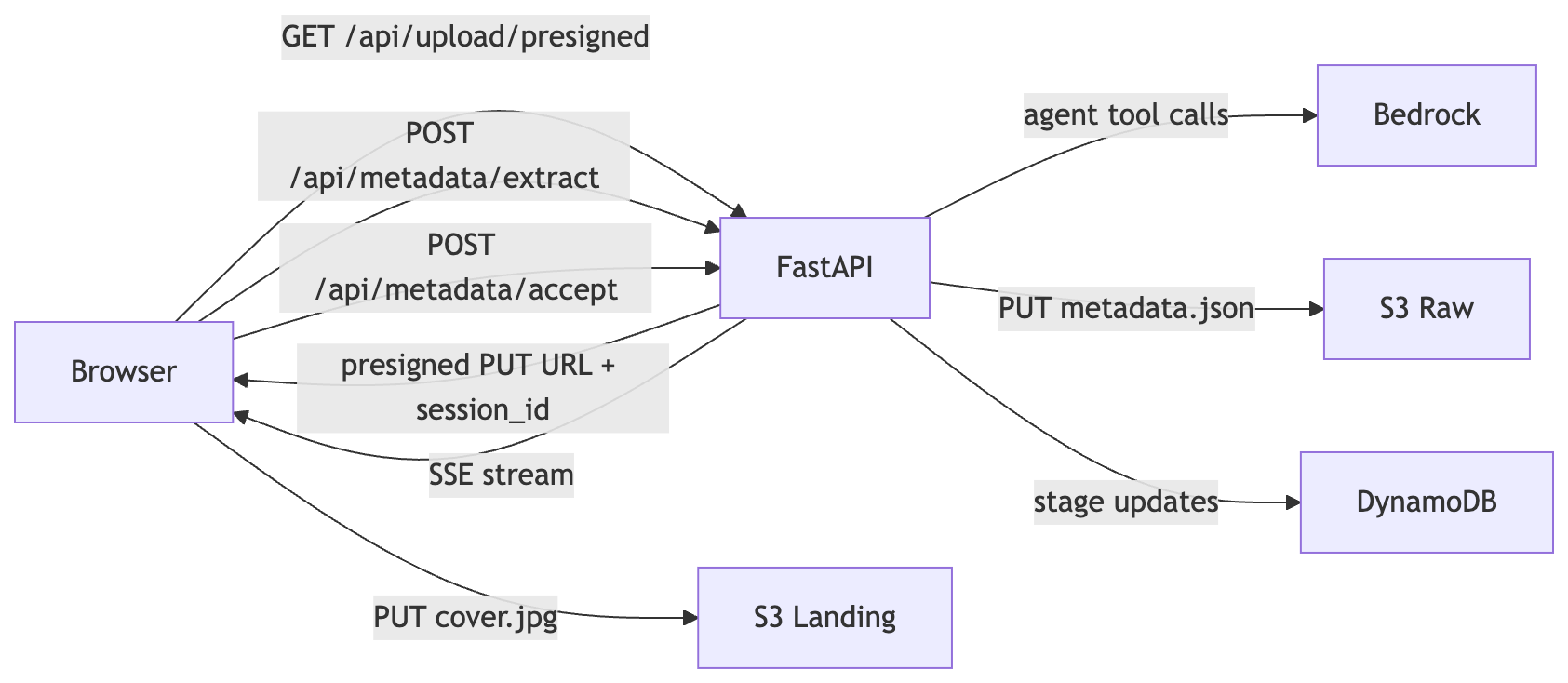
flowchart LR
    Browser -->|"GET /api/upload/presigned"| FastAPI
    FastAPI -->|"presigned PUT URL + session_id"| Browser
    Browser -->|"PUT cover.jpg"| S3L[S3 Landing]
    Browser -->|"POST /api/metadata/extract"| FastAPI
    FastAPI -->|"SSE stream"| Browser
    FastAPI -->|"agent tool calls"| Bedrock
    Browser -->|"POST /api/metadata/accept"| FastAPI
    FastAPI -->|"PUT metadata.json"| S3R[S3 Raw]
    FastAPI -->|"stage updates"| DynamoDB
The binary never routes through the FastAPI service. The browser PUT goes directly to S3 via a presigned URL. FastAPI’s responsibilities are generating the upload URL, running the extraction agent, accepting confirmed metadata, and recording every stage transition in DynamoDB. No file bytes ever touch the container.
The application itself is thin — all behaviour is delegated to handler classes:
app = FastAPI(title="Bookshelf Streaming Agent")

_presigned = PresignedUrlHandler()
_metadata = MetadataHandler()
_accept = AcceptHandler(dynamodb_resource=_dynamodb)
_ops = OpsHandler()

@app.get("/api/upload/presigned")
async def get_presigned_url(request: Request) -> JSONResponse:
    return await _presigned.handle(request)

@app.post("/api/metadata/extract")
async def metadata_extract(request: Request) -> StreamingResponse:
    return await _metadata.handle(request)

@app.post("/api/metadata/accept")
async def metadata_accept(request: Request) -> JSONResponse:
    return await _accept.handle(request)

@app.get("/api/ops/files")
async def ops_list_files(request: Request) -> JSONResponse:
    return await _ops.handle_list(request)

@app.get("/api/ops/files/{file_id}")
async def ops_get_file(request: Request, file_id: str) -> JSONResponse:
    return await _ops.handle_get(request, file_id)
Each handler is independently testable — the same principle that motivated splitting the Lambda monolith in post 2. The remaining sections walk through each part of this flow in turn.
Pre-signed URL for Upload
Pre-signed URLs are one of those patterns I’ve carried from client work into almost every project that involves file uploads since. They’re straightforward to set up and the security properties come for free: the browser uploads directly to S3 using a short-lived, scoped URL signed by the backend’s IAM role. AWS credentials never leave the server. The binary never routes through the application.
The endpoint generates a UUID for the session, constructs an S3 key under a controlled prefix, and signs a PUT URL valid for one hour:
session_id = str(uuid.uuid4())
key = f"ui/uploads/{session_id}/{filename}"

url = self._s3.generate_presigned_url(
    "put_object",
    Params={"Bucket": self._landing_bucket, "Key": key},
    ExpiresIn=3600,
)

return JSONResponse({
    "url": url,
    "key": key,
    "bucket": self._landing_bucket,
    "session_id": session_id,
})
The session_id is the thread that runs through the rest of the workflow. The S3 object lands at ui/uploads/{session_id}/{filename}, and every subsequent call — /api/metadata/extract, /api/metadata/accept — passes that same ID to tie the agent conversation back to the upload. The backend controls the key prefix; the browser can write to exactly that key and nothing else.
One session_id per upload also acts as a scoping primitive beyond the immediate workflow. Agent toolsets, state machines, and downstream processes can be built to accept a single ID and restrict all their operations to it — reading only the DynamoDB record for that session, writing only to the S3 prefix for that session, never touching another. In a multi-tenant SaaS system that boundary prevents data from one client leaking into another’s context. In a B2C setup it prevents one user’s data being associated with another’s. The UUID generated here is cheap to produce; the isolation it enables is not cheap to retrofit later. Future posts will cover how the agent toolsets and pipeline tracking build on exactly this — but the boundary starts here.
There’s no clever infrastructure here. It’s a standard AWS pattern, available from day one of S3. The reason it matters for an agent workflow is the same reason it matters anywhere: keeping file bytes out of the application layer removes an entire class of problems — upload progress, request timeouts, memory pressure — and lets the FastAPI service focus on the work only it can do.
Centralised DynamoDB Pipeline Tracking
The tracking table is the single source of truth for every file that has been uploaded: what state it’s in, what happened at each stage, and when. Everything else in the system can read from it — the ops dashboard, the agent toolsets, future pipeline stages — but nothing needs to reconstruct that state from logs or infer it from S3 prefixes. It’s written explicitly, in the same code path as the operations it describes.
The stage model for 2.0.0 is defined in ADR-0002:
| Stage | Started | Completed |
|---|---|---|
| USER_UPLOAD | File handed to presigned URL | Browser uploads successfully to S3 landing bucket |
| ENRICHMENT | /api/metadata/extract called | /api/metadata/accept saves confirmed metadata to raw bucket |
| ROUTING | (future) | (future) |
| AV_SCAN | (future) | (future) |
ROUTING and AV_SCAN were pre-defined from the client work — anticipated future stages rather than speculative additions. The client engagement involves multi-stage processing pipelines where files move through validation, routing, and security scanning after initial ingestion. Reserving those stage names in the schema avoids a migration later. 2.1.0 revisited this model substantially, but for 2.0.0 the four stages represent the anticipated shape of the full pipeline.
ENRICHMENT in 2.0.0 covers the entire AI-driven workflow in a single stage — from the initial extraction call through any user refinement loops to final acceptance. It stays IN_PROGRESS while the user is reviewing, completes only when they accept, and fails if Bedrock throttles. It’s a simplification: the client work uses finer-grained stages, but the demo anticipated one or two stages at most, so the broader grouping was acceptable. It was sub-optimal and was one of the things refactored in 2.1.0.
The tracking calls sit at the S3 write boundary in accept_handler.py. On a successful accept:
self._tracker.complete_stage(
    user_id=user_id,
    upload_id=upload_id,
    stage=UploadStage.ENRICHMENT,
    dest_bucket=self._raw_bucket,
    dest_key=key,
)
On failure — S3 write fails, or Bedrock throttled upstream:
self._tracker.fail_stage(
    user_id=user_id,
    upload_id=upload_id,
    stage=UploadStage.ENRICHMENT,
    error_message="Failed to save metadata to S3",
)
A Bedrock 429 produces a record like this:
{
  "upload_id": "abc-123",
  "current_status": "FAILED",
  "stage_progress": [
    {
      "stage_name": "user_upload",
      "status": "success",
      "start_time": "2026-04-15T14:32:00Z",
      "end_time": "2026-04-15T14:32:05Z",
      "processing_time": 5.234
    },
    {
      "stage_name": "enrichment",
      "status": "failed",
      "start_time": "2026-04-15T14:32:06Z",
      "end_time": "2026-04-15T14:32:15Z",
      "error_message": "Bedrock API error: ModelHTTPError: status_code: 429"
    }
  ]
}
That record tells the full story without touching CloudWatch — the file arrived, the extraction failed, and here’s why. Every record is also keyed by upload_id — the same session_id generated at presigned URL time. Agent toolsets and downstream processes can read from this table scoped to a single ID, and operate only on the data belonging to that session. Combined with the S3 key scoping described in the previous section, this is where the data isolation guarantee lives. A toolset that reads from DynamoDB by upload_id and writes only to the matching S3 prefix cannot accidentally surface one user’s data to another, regardless of how it’s composed or extended later.
The Frontend
A brief overview of the frontend
The frontend is deliberately minimal. The goal was never a polished UX — it was a visual way to demonstrate the concepts at a conference talk without asking the audience to follow along in a terminal. In practice that meant building just enough: an upload flow, a metadata review screen, and an ops dashboard. Nothing more.
It took about two weeks of evenings to build, roughly double the time the backend took — not because it’s complex, but because frontend work isn’t where I naturally spend my time. I’m primarily a systems architect and backend engineer; frontend is an interesting discipline, just not my one. The backend is where the interesting architecture lives for me; the frontend exists to make that architecture visible and accessible to an audience that shouldn’t need to run curl to see it working.
Frontend visualisation of DynamoDB pipeline tracking
The ops dashboard is the most practically useful part of the frontend, both for demos and for development. It reads directly from the /api/ops/files endpoint and renders every upload as a row in a filterable list:
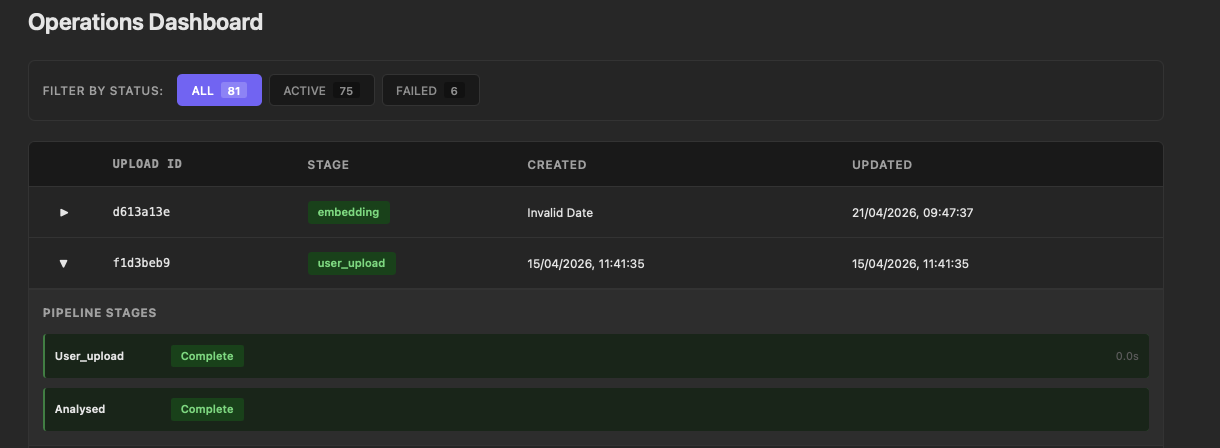
The status filters at the top — ALL, ACTIVE, FAILED — give an immediate count of where things stand across all uploads. Expanding any row reveals the pipeline stages beneath it: each stage shows its status and processing time. A failed extraction surfaces here with the error message visible on expand, without needing to open CloudWatch or query DynamoDB directly.
During development this turned out to be the fastest way to understand what was actually happening. When Bedrock throttled, the ENRICHMENT stage went red immediately and the 429 was right there. When a session was abandoned mid-flow — navigating away before accepting — the IN_PROGRESS state was visible rather than silent. That observability was useful enough that it shaped how I approached the client work: having a dashboard that reads from the tracking table is now something I build early rather than as an afterthought.
Production Considerations
Deployment
For the bookshelf demo, the FastAPI container runs locally or gets pushed to a lightweight container runtime when needed. In production the pattern is the same but the infrastructure is different: ECS Fargate behind an Application Load Balancer, with the streaming endpoints accessible via a dedicated API route. Lambda handles everything else — event-driven processing, background jobs, the majority of API routes. The container is reserved for the endpoints that need persistent connections. That separation keeps the operational overhead low; most of the system stays serverless, and the container fleet only needs to scale for streaming traffic.
Security and multi-tenancy
The 2.0.0 code defers authentication with a TODO in accept_handler.py:
user_id = "anonymous" # TODO: extract from auth context in productionIn production this would be replaced with Cognito. Users authenticate via the frontend, which receives a Cognito token. The API validates that token on every request and reads two pieces of identity from it: the user’s own ID and, in a multi-tenant SaaS setup, their tenant ID. Every subsequent operation is scoped to the combination of those two values.
What that looks like in practice: upload records in DynamoDB carry both the tenant ID and user ID. S3 keys are prefixed with both — tenant={tenant_id}/user={user_id}/uploads/{session_id}/. If a file belongs to reference data shared across a tenant rather than a specific user, the tenant ID alone routes it to a client-specific location. Agent toolsets read from DynamoDB filtered by tenant and user ID; they can only surface records belonging to that combination. The session_id scoping described earlier in this post sits inside that outer boundary — the isolation is layered.
The bookshelf demo never intends to implement authentication — "anonymous" is a permanent placeholder. The field exists in the data model to show where the value would come from in a production system.
Observability
Every stage transition is written to DynamoDB — start, complete, fail — with a processing_time field computed from the start and end timestamps. Per-stage latency history is available without additional instrumentation; the ops dashboard reads it directly.
DynamoDB stores numeric types as Decimal, which Python’s json.dumps cannot serialise without a custom handler. The ops endpoint handles this with:
def _serialise(obj: Any) -> str:
    if isinstance(obj, Decimal):
        return str(obj)
    raise TypeError(f"Object of type {type(obj)} is not JSON serialisable")
The _serialise function is the standard fix — expect to write it in any Python service that reads numeric values from DynamoDB for JSON output.
Conclusion
The moment that made the streaming architecture click wasn’t a technical benchmark — it was adding some basic chunking toolsets for the supply-chain consultancy, scoped to specific tenants via the DynamoDB tracking table, and watching the agent immediately reason across everything we’d ingested for that client. About an hour of coding. The agent went from answering questions about individual files to having full contextual awareness of the entire data landscape we’d built. Refining and extending those toolsets since has continued to deepen its ability to reason within the supply-chain problem domain. When I implemented equivalent toolsets in the bookshelf demo, the same thing happened from the first run.
The gap in capability between a prompt wrapper and a multi-tool agent is large; the gap in implementation effort is much smaller than it looks. The toolsets themselves are ordinary software engineering — functions with a decorator and a descriptive docstring. The agent framework handles when to call them, how to incorporate their results, and how to continue reasoning toward a valid output. What makes that tractable at speed is having a single source of truth for what your data looks like and who it belongs to. When every upload record carries a tenant ID, a user ID, and a session ID, and every S3 prefix mirrors that structure, a new toolset can be scoped correctly from the start. There’s no ambiguity about which data it should touch.
The architecture in this post — presigned upload, FastAPI streaming container, centralised DynamoDB tracking — is the foundation that makes that straightforward, not because the components are novel but because they compose cleanly and the scoping is established early. The code for 2.0.0 is tagged and available: sudoblark.ai.bookshelf-demo 2.0.0.
Further Reading:
- Event-Driven Vision Inference — post 1 in this series: Lambda pipeline, Bedrock vision inference, Parquet output
- Replacing the Bedrock Chain with pydantic-ai — post 2: replacing tightly-coupled Bedrock calls with a pydantic-ai agent
- sudoblark.ai.bookshelf-demo 2.0.0 — the release this post describes, with full source
- FastAPI docs — streaming responses and SSE in FastAPI
- pydantic-ai docs — the agent framework driving the extraction workflow
Part 3 of 3 in AI Vision Inference