
Composable pipelines
CI/CD run as a platform rather than a collection of pipelines, so your standards are enforced in one place and teams build their own pipelines from ready-made parts.
By: Benjamin Clark
Intent
This pattern assumes many repositories, each built and deployed through a CI/CD platform such as GitHub Actions or Azure Pipelines, often at the scale that self-service infrastructure brings, as in data-driven Terraform. It defines a scalable, maintainable CI/CD system, built from composable components, naming conventions and automated enforcement of the organisation's standards, so that CI/CD becomes a platform teams serve themselves from, rather than a collection of hand-built pipelines. This enables three outcomes:
- Non-functional requirements, the qualities a system needs beyond its features, such as security, code quality and test coverage, are enforced across the business with little friction.
- New pipelines take far less time to create, because teams compose them from documented, ready-made components.
- Ownership of pipelines shifts left, from platform teams to the developers who use them.
Motivation
Self-service infrastructure multiplies what each team deploys, and that scale strains the non-functional requirements that the Rugged Software movement set out to protect: performance, security and quality. A handful of pipelines can be managed by hand, but past roughly ten pipelines for each specialist, or twenty repositories deploying to several environments, pipelines that grow organically, each copied from the last, fail in three ways:
- Traceability is lost. Who deployed what, when and how becomes ambiguous, because every pipeline is named and built differently.
- Flexibility is lost. With no central control, every new or updated standard, such as a security scan, has to be copied into every pipeline by hand, and any pipeline that's missed falls out of compliance unnoticed.
- Specialists work on the wrong things. Pipeline specialists spend their time hand-crafting pipelines rather than building the platform, and the pipelines become a big ball of mud.
This pattern applies the same principles as data-driven Terraform to CI/CD: pipelines are a software deliverable, and self-service and governance are made as frictionless as possible. It standardises four components, each with its own purpose:
- Naming conventions make every run traceable from its name alone, answering who deployed what, when and how. Every workflow sits in a hierarchy of project, repository, workflow type and environment, with the application added between repository and type wherever one repository holds several applications.
- A composable task library enforces governance and provides reusable functionality. Each task does one job, such as planning or applying infrastructure, and the library is released with semantic versions. While a task's interface stays the same, the platform team can improve how it works without breaking the pipelines that use it.
- Internal command-line interface (CLI) tooling plugs gaps in the platform's functionality, such as checking branch names, commenting on pull requests, or confirming a ticket is approved before a merge. It's built in its own repository, released to an artefact repository and wrapped in a task, so it moves with you if you change CI/CD platform.
- Documentation makes the platform discoverable and usable. Every task's interface, with its inputs, outputs and examples, is documented to the same standard as the modules in data-driven Terraform.
Pipeline specialists then move from hand-crafting pipelines to providing a platform that enables self-service and enforces governance. Everyone else serves themselves, while the business keeps its non-functional requirements enforced in one place.
The library grows in the way Kent Beck describes in extreme programming: make a component work in the repository that needs it, make it right by generalising it into the library, then make it fast once real use shows where the time goes. The library then only ever holds components that a real team needed.
Once the estate is organised this way, it can also be observed. The platform's webhooks can feed a record of every run, as in event and discovery sync, pointing the platform team at the slowest pipelines and the tasks that fail most.
The two variants below differ in how workflows reach each repository, and one estate can use both.
Applicability
Use this pattern when:
- You want to enforce non-functional requirements, through code quality standards, in the same way across the business.
- You manage more than ten pipelines for each specialist.
- Your teams spend significant time copying and pasting existing workflows, rather than delivering platform features.
- You roll out to several environments across more than twenty repositories.
Do not use this pattern when:
- Your CI/CD requirements are trivial, and don't need central management by a specialist team.
- Your pipeline team lacks development discipline, because composable tasks need strict interfaces, documentation and requirements to be usable.
- Your workflows are genuinely unique across teams, with no meaningful overlap, where standardising too early adds complexity for no benefit.
Structure
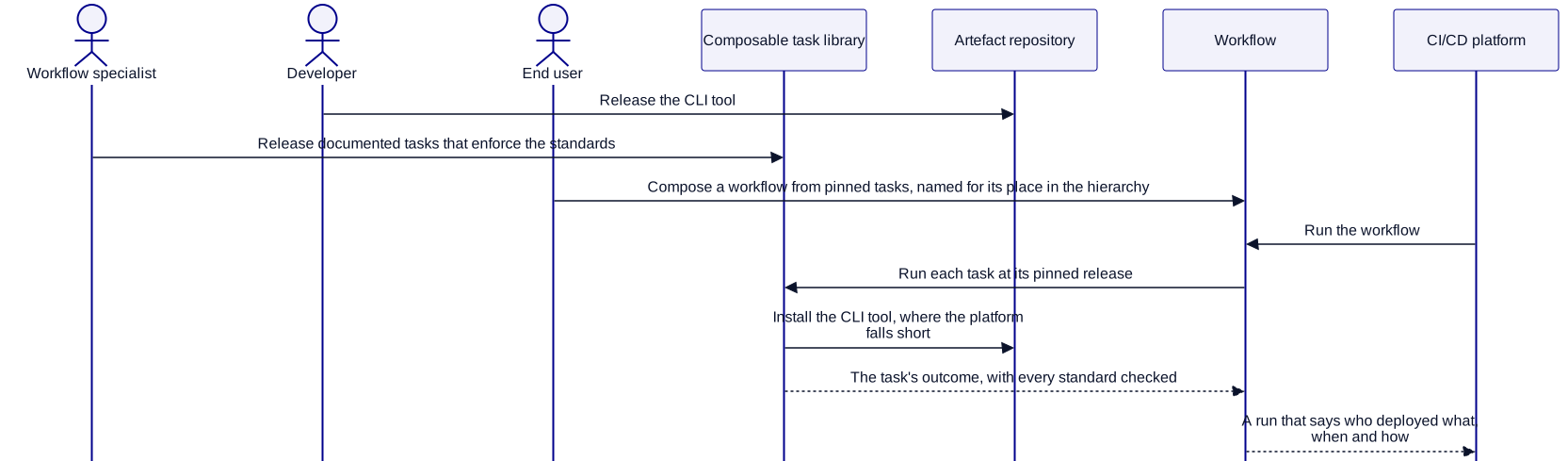
Variant A: Pull model
When teams should serve themselves, and choose when to take changes, this variant works best.
- The platform team maintains a library of composable tasks, released with semantic versions.
- Each repository orchestrates those tasks into the workflows it needs, pinning the release of each.
- Whole workflows can also be released as versioned, composable artefacts, for repositories to use as they are.
Variant B: Push model
When a central team controls the source control platform, and a change must reach every repository at once, this variant works best.
- Workflows are released with semantic versions and pushed into each repository, such as by a repository factory.
- Each workflow reads a standard configuration at runtime, so each repository can customise it.
Participants
| Participant | Role |
|---|---|
| CI/CD platform | Runs the workflows, such as GitHub Actions or Azure Pipelines. |
| Platform primitives | Provide the platform's native building blocks, such as checking out code, from which tasks are composed. A primitive can also call the CLI tool. |
| CLI tool | Bridges gaps in the platform with internal tooling, such as calls to your own APIs. |
| Artefact repository | Stores each release of the CLI tool, so that tasks install it from there rather than depending on its source. |
| Composable task library | Holds semantically versioned tasks that fulfil the business's needs. Each task is the platform's own reusable unit, such as a composite action in GitHub Actions or a template in Azure Pipelines. |
| Workflow | Orchestrates tasks and platform primitives to achieve one outcome, such as a repository's CI, or its deployment to one environment. |
| Workflow source | Holds the single source of truth for each workflow, in Variant B. |
| Workflow specialist | Creates tasks and workflows. Can also be a developer or an end user. |
| Developer | Creates the CLI tooling. Can also be a workflow specialist or an end user. |
| End user | Needs workflows, and builds them from the library. Can also be a workflow specialist or a developer. |
| Governance and quality standards | Set the business's measures, such as code coverage or security scanning, which the task library enforces. |
Constraints and trade-offs
- Quick turnarounds are required. If components don't meet teams' needs, and new ones take too long to arrive, standardisation becomes a bottleneck rather than a multiplier.
- Naming conventions may be constrained by the platform. Most platforms let pipelines be organised into folders, but GitHub Actions requires a flat structure, which limits what a naming convention can express. Support for subfolders has been an open feature request since 2022.
- Internal tooling creates overhead. Designing, building and distributing a CLI tool is only worth it where off-the-shelf functionality has significant gaps, such as integrating with your own APIs.
- Documentation discipline is required. If documentation falls out of step with the components, the platform's developer experience suffers, and teams go back to reading each task's source.
Variant A: Pull model trade-offs
- The core benefit is standardisation, and shorter lead times for new pipelines. Required code coverage and scanning, for example, are enforced in one place, and teams compose ready-made components faster than they could build their own.
- The core cost is versioning, as in data-driven Terraform, and with it the complexity of organisation-wide changes: enforcing a new check needs a new release taken up by every repository, which may mean interface changes too. Those upgrades can be automated, but building that automation is a significant piece of work in its own right.
Variant B: Push model trade-offs
- The core benefit is lead time for organisation-wide changes: with workflows managed in one place, a new security policy or quality check reaches every repository at once.
- The core cost is inflexibility: one team's edge case affects every other team's workflow, and past roughly fifty repositories, the conditional logic needed for every edge case can force a move to the pull model.
Part of how I deliver
This is how I turn CI/CD from a collection of hand-built pipelines into a platform your teams serve themselves from. It's one of many patterns I bring through contract delivery, and it carries over between CI/CD platforms.
Are your engineers waiting on infrastructure?
I build infrastructure and pipelines your engineers serve themselves from, with your standards enforced in one place. If releases are slow, risky or queued behind one specialist, book a call and we'll talk it through.