
Connecting AI clients to an MCP server
One MCP server for the AI tools your people use and the agentic systems you build, with the right identity and controls for each.
By: Benjamin Clark
Intent
This pattern assumes a remote MCP server secured as in OAuth login for remote MCP servers. It sets out how each AI client connects to that server, whose identity it uses and what it's allowed to do. An AI client here is any software that calls the server: a chat agent, a coding agent or an agentic system. There are two variants, one for people and one for agentic systems. This enables three outcomes:
- Adopting a new AI client means configuring it, rather than building a new integration.
- Every call is made under a known identity, so the server's permissions and audit trail always apply.
- What agents can do is enforced by controls, rather than left to their instructions.
Motivation
Most organisations have no plan for how AI clients connect. Each person adds the server by hand, and each agent gets whatever credentials are to hand, which fails in three ways:
- Configuration drifts. Each machine ends up with its own server URL and its own approvals, so nobody can say what's connected where.
- Guidance is missing. A server describes its tools, but not how your organisation wants them used.
- Identity gets blurred. An unattended agent often borrows a person's token, so the audit trail can't tell the agent from the person.
This pattern manages the connection like any other shared dependency: decided once, and kept with the code. All AI clients speak the same protocol, so one server can serve them all, and only how they connect and whose identity they carry differs. On a multi-tenant platform, each tenant is still a separate connection, as in tenant-scoped MCP connectors.
Applicability
Use this pattern when:
- People's chat agents and coding agents, or your agentic systems, need the same remote MCP server.
- People use different AI clients, and should all get the same access and the same guidance.
- What agents can do through the server must be enforced, not just asked for.
Do not use this pattern when:
- It's one person's experiment, where adding the server by hand is enough.
- Only one AI client will ever use the server, so shared guidance and allow-lists would add more than they give.
Structure
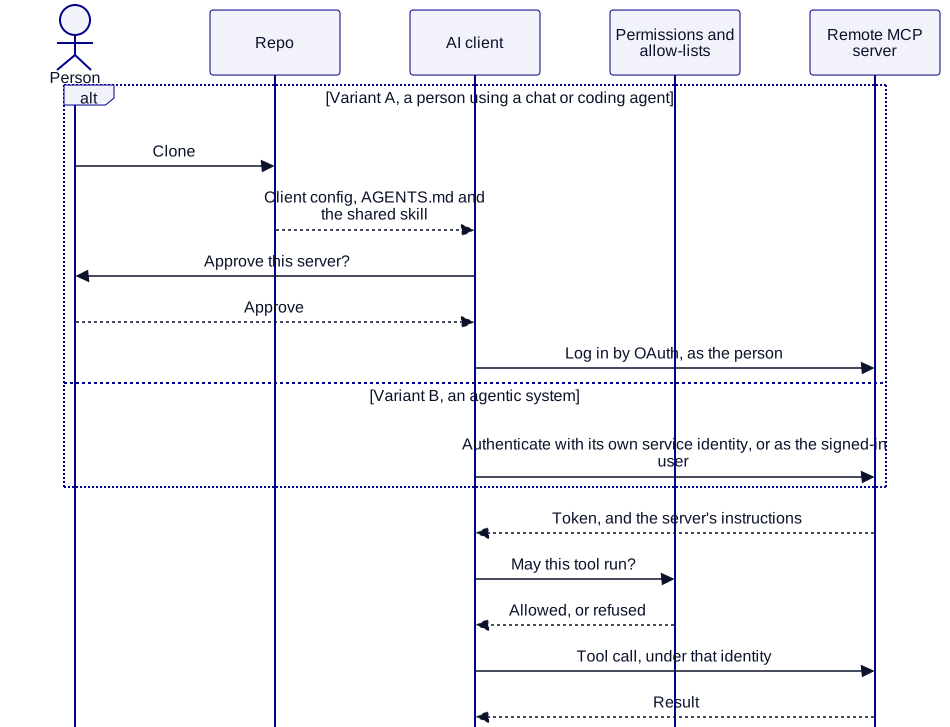
Variant A: People using chat and coding agents
When people use a chat agent or a coding agent and sign in themselves, this variant works best.
- For coding agents, the client config is committed to the repo, with the server's URL and a public client ID and no secrets, so a new starter gets the server by cloning the repo.
- For chat agents, an administrator adds the connector once for the organisation, and each person then connects to it.
- Guidance sits with the code, as in guardrails, skills and workflow for agents.
- Each person signs in as themselves by OAuth, and each AI client's permissions limit which tools it can call.
Variant B: Agentic systems
When software calls the server with no person signing in, or on a person's behalf, such as a scheduled agent or an assistant inside your product, this variant works best.
- The system connects as an MCP client, and uses the server as one of its capabilities, built as in capabilities and safeguards for AI agents.
- An unattended agent has its own identity, through a client credentials grant, with its own scope and its own entries in the audit trail. It never borrows a person's token.
- An assistant acting for a signed-in user passes that user's access token, so the server applies that user's permissions.
Participants
| Participant | Role |
|---|---|
| Person | Uses a chat or coding agent, approves the server and signs in as themselves. |
| Repo | Holds a coding agent's client config, and the guidance that points it to the server. |
| AI client | A chat agent, a coding agent or an agentic system. |
| Permissions and allow-lists | Limit which tools each AI client can call, and which servers can be added. |
| Remote MCP server | Speaks the standard protocol, requires a sign-in, and gives AI clients its own instructions. |
Constraints and trade-offs
- Guidance isn't enforcement. Language models are non-deterministic, so an agent can ignore its guidance or the server's instructions, which is why anything that must hold sits in permissions and allow-lists.
- Each AI client has its own config file and format, such as Claude Code's and VS Code's, so changing the server's details means updating several files.
- Each AI client must be registered with the server before it can connect, as OAuth login for remote MCP servers explains, so adopting a new one takes a change there too.
- Support for MCP changes quickly across AI clients, so check each one's docs when you set it up.
Variant A: People using chat and coding agents trade-offs
- The core benefit is that people's existing permissions and audit trail apply, with no new identity to secure.
- The core cost is that someone has to sign in through a browser, so it can't serve anything that runs unattended.
Variant B: Agentic systems trade-offs
- The core benefit is that agents use the same server as your people, so there's no second integration to maintain.
- The core cost is ownership: a service identity has no person behind it, so someone has to be accountable for what it's allowed to do.
Part of how I deliver
This is how I connect a server to the AI tools your people already use and the agentic systems you build. It's one of many patterns I draw on through contract delivery, alongside the way I set up AI agents to work with your team.
AI in your systems, safely
I put chatbots and MCP servers into the systems businesses already run, reaching only what they should. If you want one on yours, book a call and we'll talk it through.