
Multi-tenant portal frontend
One web app for every client on your platform, showing each only what they've bought, from one build promoted through every environment.
By: Benjamin Clark
Intent
This pattern assumes a multi-tenant API that already enforces which client and which user can see what, as in multi-tenant API. It builds one web app over that API for every client: one build promoted through every environment, every backend call made through a typed client, and navigation driven by each client's features and each user's groups. This enables three outcomes:
- The build you tested in staging is the build that ships.
- Each client sees only the features they've bought, without feature checks copied into every page.
- A front-end mistake can show the wrong menu, but not the wrong data, because the API decides what data leaves the server.
Motivation
A tenant portal built quickly tends to fail in three ways:
- Environment values are baked into the bundle. Each environment then needs its own build, so what you tested isn't what ships. The twelve-factor app keeps configuration in the environment for this reason.
- API calls spread through components. Authentication and error handling get copied from page to page, and one change to the API means hunting through all of them.
- Feature checks are copied into every page, where they drift apart, until nobody can say what a given client should see.
This pattern keeps the portal a thin layer over the API. The API stays the only place that decides what a client or user may see, and the portal reflects those decisions rather than repeating them: its navigation follows each client's features and each user's groups, so hiding a page is never what protects it. Configuration is read from the environment when the app starts, and each client's branding is loaded with that client's record from the API, so one build serves every client in every environment, and a new client's look needs no release.
Applicability
Use this pattern when:
- One web app serves many tenants, each seeing only the features they've bought.
- The backend is an authenticated API, and the app is mostly screens over it.
- The same build must run in every environment, promoted rather than rebuilt.
Do not use this pattern when:
- It's a single-tenant internal tool, where feature gating and themes are overhead.
Structure
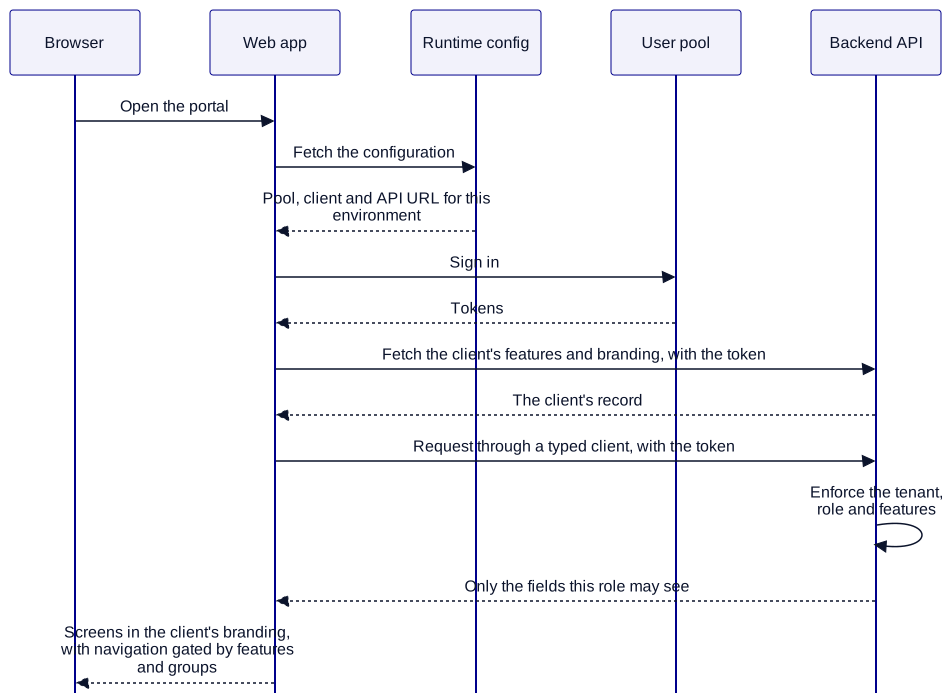
Participants
| Participant | Role |
|---|---|
| Browser | Runs the app, which fetches its configuration once at startup. |
| Web app | One build, with thin routes over page components, behind a firewall such as AWS WAF. |
| Runtime config | Returns the user pool, app client and API URL for the environment the app runs in. |
| User pool | Signs the user in, as in the auth pattern this builds on. |
| Backend API | Enforces every rule, returns each client's features and branding, and leaves out any field a role mustn't see. |
Constraints and trade-offs
- The app fetches its configuration before it can sign anyone in, which adds a round trip before the first screen.
- The app can't know a user's client until they sign in, so the sign-in screen is unbranded unless each client has its own address.
Part of how I deliver
When a platform's clients need to see their own product, this is how I build the front of it. It's one of many patterns I bring through contract delivery, and it keeps the portal simple enough for your own team to carry on with.
Is every new client a project?
I build multi-tenant platforms where adding a client is routine, and each client's data stays its own. If you're building one, or yours has become hard to scale, book a call and we'll talk it through.