
Provisioning API Gateway from an OpenAPI spec and deploying SwaggerUI to S3

Introduction
The monsternames-api refactor was always going to happen in stages. I’d been running the original Flask/MySQL/EC2 setup since 2020, and by mid-2023 I’d accepted that it needed to go — Lambda, DynamoDB, API Gateway, Terraform. The right tools, provisioned properly.
Before I could tackle the backend, though, I needed to do two things: define what the API actually looked like in a machine-readable format, and establish the AWS infrastructure that would eventually serve both the documentation and the API itself. Getting these right first would make the actual Lambda refactor considerably cleaner.
The answer to both was a single OpenAPI YAML file. aws_api_gateway_rest_api accepts an OpenAPI spec directly as its body — so the same file that feeds SwaggerUI also provisions the API Gateway, templated with per-environment Lambda ARNs. Trying to build the equivalent from Terraform’s native resource primitives — one aws_api_gateway_method and aws_api_gateway_integration per endpoint — produces spaghetti by the time you have six endpoints and twelve HTTP methods.
I chose SwaggerUI over alternatives like Redoc partly because it integrates naturally with tooling I already use — it has first-class support in Backstage, and most engineers and infrastructure people I work with already understand it. The interactive try-it-out interface is what matters when demonstrating an API in front of a room of people who’ve never seen it before. Getting a goblin name back in real time communicates the point faster than any architecture diagram.
The documentation site lives behind an API Gateway rather than a public S3 bucket — not because I needed the complexity, but because the Lambda backend would eventually hang off the same gateway. Establishing a single front door at this stage meant DNS, the custom domain, and the URL structure were all consistent before a single line of Lambda code was written.
The goal
By the end of this post, the following should be clear:
- How to write an OpenAPI 3.0.1 spec that functions as both a SwaggerUI source and a Terraform input for
aws_api_gateway_rest_api - How Terraform’s
templatefilefunction injects per-environment Lambda ARNs into the spec at plan time - How to deploy a SwaggerUI static site to a private S3 bucket via GitHub Actions, with PR validation and GitOps-style promotion
- How to configure API Gateway as a proxy for S3 static content using an IAM role, rather than making the bucket public
- Where CORS breaks this setup, and how to fix it
Prerequisites
- Familiarity with Terraform basics — the monsternames-api refactoring post provides direct context on how the API Gateway eventually used this spec
- Basic AWS knowledge: IAM roles and policies, S3, API Gateway
- Familiarity with GitHub Actions workflows
- The original monsternames-api post for background on what the API does
Writing the OpenAPI definition
The spec is a full OpenAPI 3.0.1 YAML file covering all six monster types, written by hand using the Swagger Editor. It’s a split-pane browser tool that validates your YAML in real time and renders the SwaggerUI output live as you type — for someone learning the format from scratch, immediate visual feedback for every change makes the process considerably less painful.
A metadata block defines the API title and server URL. A tags list groups endpoints by monster type. The paths section defines the individual endpoints, and components holds the reusable schemas, examples, and response definitions that are $ref’d throughout — define a response shape once and reference it from every endpoint that returns it:
paths:
  /goatmen:
    post:
      summary: Add pseudo-random name options
      security:
        - ApiKeyAuth: [ApiKeyAuth]
      tags:
        - goatmen
      requestBody:
        description: Add first name
        required: true
        content:
          application/json:
            schema:
              $ref: "#/components/schemas/FirstNameModel"
            examples:
              first_name:
                $ref: "#/components/examples/FirstName"
      responses:
        "200":
          $ref: "#/components/responses/200PostFirstName"
        "400":
          $ref: "#/components/responses/400PostInvalidBody"
        "409":
          $ref: "#/components/responses/409PostAlreadyExists"
    get:
      summary: Retrieve a pseudo-random name
      tags:
        - goatmen
      responses:
        "200":
          $ref: "#/components/responses/200GetFirstName"
The security scheme for POST endpoints is an API key in the X-API-Key header — adequate for a personal project where the threat model is someone accidentally adding goatmen names rather than anything more serious.
The components section handles all the reuse. Schemas define the permissible request body shapes; response components define what callers can expect back. Both are referenced by $ref throughout the paths, so adding a new monster type means a new pair of path entries and nothing else:
components:
  schemas:
    FirstNameModel:
      type: object
      required:
        - first_name
      properties:
        first_name:
          type: string
  responses:
    200GetFirstName:
      description: "Successful response"
      content:
        application/json:
          schema:
            type: object
            required:
              - first_name
              - full_name
            properties:
              first_name:
                type: string
              full_name:
                type: string
  securitySchemes:
    ApiKeyAuth:
      type: apiKey
      in: header
      name: X-API-Key
Once the YAML was valid — confirmed with swagger-cli validate open-api.yaml — I could verify that SwaggerUI rendered it correctly using the official Docker image against the old API:
docker run -it \
    --mount type=bind,source="$(pwd)"/open-api.yaml,target=/usr/share/nginx/html/open-api.yaml \
    -p 8080:8080 \
    -e API_URL=open-api.yaml \
    swaggerapi/swagger-ui
CI/CD: keep it simple
The GitHub Actions setup has two jobs. On pull request, it validates the spec:
name: OpenAPI checks on pull request

env:
  OPEN_API_YAML_PATH: open-api.yaml

on: [pull_request]

jobs:
  validation:
    name: OpenAPI validate
    runs-on: ubuntu-20.04
    steps:
      - uses: actions/checkout@v3

      - name: Swagger-cli validate
        uses: mpetrunic/swagger-cli-action@v1.0.0
        with:
          command: "validate ${{ env.OPEN_API_YAML_PATH }}"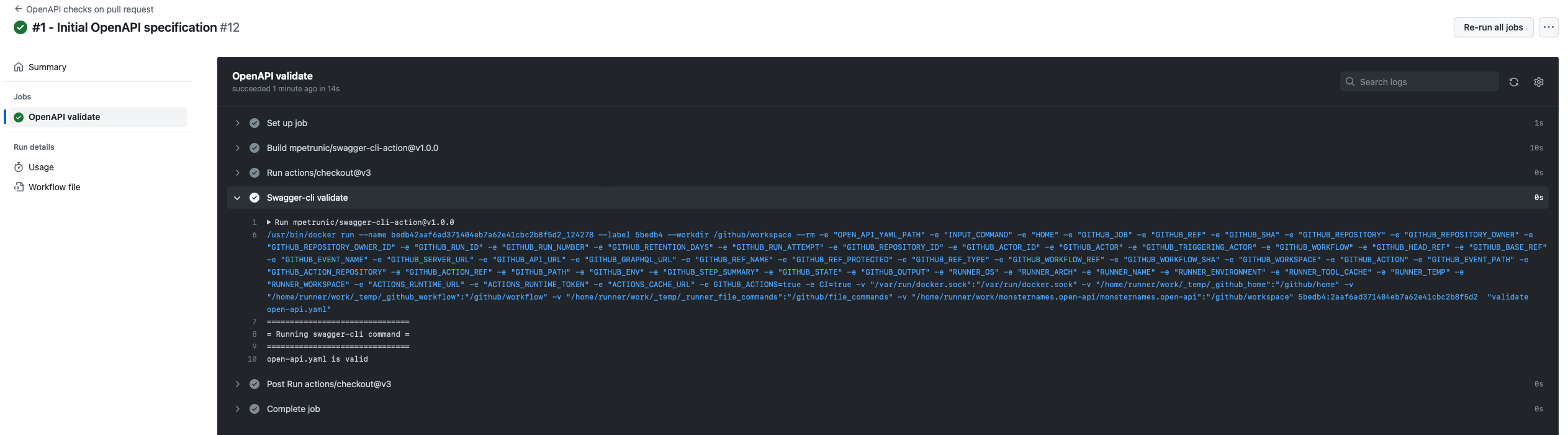
On merge to main, it pushes the SwaggerUI to S3 and updates the GitHub deployment status.
The SwaggerUI itself is a single index.html that loads the bundle from a CDN and points it at the raw spec on GitHub. I spent time attempting to compile a proper static build with swagger-dist before concluding that CDN loading was both simpler and entirely sufficient:
<!DOCTYPE html>
<html lang="en">
  <head>
    <meta charset="UTF-8">
    <title>Swagger UI</title>
    <link rel="stylesheet" type="text/css" href="https://unpkg.com/swagger-ui-dist@3/swagger-ui.css">
  </head>
  <body>
    <div id="swagger-ui"></div>
    <script src="https://unpkg.com/swagger-ui-dist@3/swagger-ui-bundle.js"></script>
    <script src="https://unpkg.com/swagger-ui-dist@3/swagger-ui-standalone-preset.js"></script>
    <script>
    window.onload = function() {
      const ui = SwaggerUIBundle({
        "dom_id": "#swagger-ui",
        deepLinking: true,
        presets: [SwaggerUIBundle.presets.apis, SwaggerUIStandalonePreset],
        plugins: [SwaggerUIBundle.plugins.DownloadUrl],
        layout: "StandaloneLayout",
        urls: [
          {url: "https://raw.githubusercontent.com/sudoblark/monsternames.open-api/main/open-api.yaml", name: "monsternames"}
        ],
        defaultModelsExpandDepth: -1,
        "urls.primaryName": "monsternames"
      })
    }
    </script>
  </body>
</html>
The merge workflow uses GitHub Deployments to track what’s live:
name: Publish OpenAPI to S3 on merge to main

env:
  AWS_ACCESS_KEY_ID: ${{ secrets.SUDOBLARK_AWS_ACCESS_KEY_ID }}
  AWS_SECRET_ACCESS_KEY: ${{ secrets.SUDOBLARK_AWS_ACCESS_KEY_VALUE }}
  AWS_DEFAULT_REGION: eu-west-2
  MONSTERNAMES_OPENAPI_STATIC_CONTENT_BUCKET: sudoblark-prod-monsternames-static-content
  ENVIRONMENT: Prod
  GITHUB_TOKEN: ${{ secrets.GITHUB_TOKEN }}

on:
  workflow_dispatch:
  push:
    branches: [main]
    paths-ignore: ['.github/**', 'LICENSE.txt']

permissions:
  contents: read
  deployments: write

jobs:
  deploy:
    name: Deploy SwaggerUI
    runs-on: ubuntu-20.04
    steps:
      - uses: actions/checkout@v3

      - name: Delete GitHub deployments
        uses: strumwolf/delete-deployment-environment@v2.2.3
        with:
          token: ${{ secrets.GITHUB_TOKEN }}
          environment: ${{ env.ENVIRONMENT }}
          onlyRemoveDeployments: true

      - name: Create GitHub deployment
        uses: chrnorm/deployment-action@releases/v1
        id: deployment
        with:
          token: ${{ secrets.GITHUB_TOKEN}}
          description: 'monsternames OpenAPI SwaggerUI'
          environment: ${{ env.ENVIRONMENT }}

      - name: Sync artefact to S3
        uses: jakejarvis/s3-sync-action@master
        with:
          args: --follow-symlinks --delete --exclude '*' --include 'index.html'
        env:
          AWS_S3_BUCKET: ${{ env.MONSTERNAMES_OPENAPI_STATIC_CONTENT_BUCKET }}
          AWS_ACCESS_KEY_ID: ${{ env.AWS_ACCESS_KEY_ID }}
          AWS_SECRET_ACCESS_KEY: ${{ env.AWS_SECRET_ACCESS_KEY }}
          AWS_REGION: ${{ env.AWS_DEFAULT_REGION }}

      - name: Update deployment status (success)
        if: success()
        uses: chrnorm/deployment-status@releases/v1
        with:
          token: ${{ secrets.GITHUB_TOKEN }}
          target_url: https://monsternames.sudoblark.com
          state: 'success'
          deployment_id: ${{ steps.deployment.outputs.deployment_id }}

      - name: Update deployment status (failed)
        if: failure()
        uses: chrnorm/deployment-status@releases/v1
        with:
          token: ${{ secrets.GITHUB_TOKEN }}
          target_url: https://monsternames.sudoblark.com
          state: 'failure'
          deployment_id: ${{ steps.deployment.outputs.deployment_id }}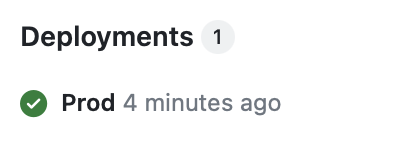
A single front door
The S3 bucket is private. The options for serving content from a private bucket without making objects publicly readable are roughly: CloudFront in front of S3, or API Gateway with an IAM role. Since the eventual Lambda backend would also live behind API Gateway, I went with the latter — one gateway, one custom domain, consistent URL structure from the start.
The S3 bucket itself is created with versioning enabled and a private ACL, with an IAM group granting the GitHub Actions user upload access:
resource "aws_s3_bucket" "static_content" {
  bucket = local.static_bucket_name
  tags   = local.default_tags
}

resource "aws_s3_bucket_versioning" "static_content_versioning" {
  bucket = aws_s3_bucket.static_content.id
  versioning_configuration {
    status = var.static_content_versioning
  }
}

resource "aws_s3_bucket_acl" "static_content_acl" {
  bucket = aws_s3_bucket.static_content.id
  acl    = "private"
}
The API Gateway integration wires a GET on the root path to the index.html object in the bucket, via an IAM role that grants read access:
resource "aws_api_gateway_integration" "swagger_ui" {
  rest_api_id             = aws_api_gateway_rest_api.api_gateway.id
  resource_id             = aws_api_gateway_rest_api.api_gateway.root_resource_id
  http_method             = aws_api_gateway_method.swagger_ui.http_method
  integration_http_method = "GET"
  credentials             = aws_iam_role.api_gateway.arn
  type                    = "AWS"
  uri                     = "arn:aws:apigateway:${var.aws_region}:s3:path//${aws_s3_bucket.static_content.id}/index.html"
}

resource "aws_api_gateway_method_response" "swagger_ui_200" {
  rest_api_id = aws_api_gateway_rest_api.api_gateway.id
  resource_id = aws_api_gateway_rest_api.api_gateway.root_resource_id
  http_method = aws_api_gateway_method.swagger_ui.http_method
  status_code = "200"

  response_parameters = {
    "method.response.header.Content-Type" = true
  }
}

resource "aws_api_gateway_integration_response" "swagger_ui_200" {
  rest_api_id = aws_api_gateway_rest_api.api_gateway.id
  resource_id = aws_api_gateway_rest_api.api_gateway.root_resource_id
  http_method = aws_api_gateway_method.swagger_ui.http_method
  status_code = "200"

  response_parameters = {
    "method.response.header.Content-Type" = "'text/html'"
  }
}
Without Content-Type: text/html in the integration response, browsers receive the response with no content type and either prompt a download or render raw HTML as text.
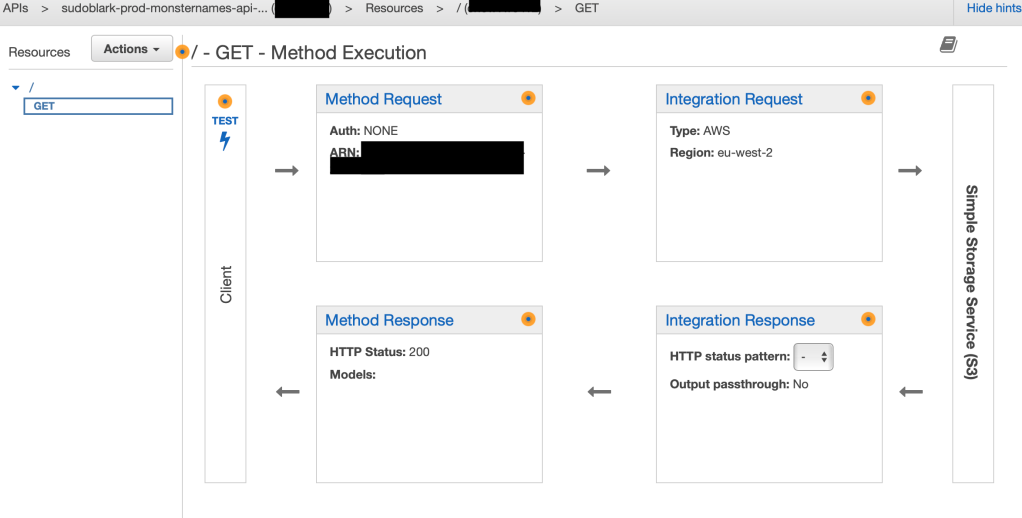
CORS was not obvious. When the index.html loads and SwaggerUI begins making requests to the API, the browser needs appropriate CORS headers on the responses. Getting these right between the API Gateway response configuration and the S3 integration took longer than the rest of the setup combined.
If your static site loads but the JavaScript does not function correctly, CORS is almost certainly the culprit. Add Access-Control-Allow-Origin to both the aws_api_gateway_method_response and aws_api_gateway_integration_response response parameters. If the frontend makes calls directly to any resource, that resource also needs a corresponding OPTIONS method. The browser error messages are unhelpful — go straight to checking the response headers with the network tab.
DNS is a custom domain (monsternames.sudoblark.com) via an ACM certificate, associated with the API Gateway stage via a custom domain name mapping. At the time my DNS was not in Route53, so the final step was a CNAME record at the registrar pointing at the API Gateway’s regional endpoint.
Provisioning API Gateway from the OpenAPI spec
The original post provisioned API Gateway using Terraform resource primitives — aws_api_gateway_method, aws_api_gateway_integration, and so on per endpoint. This section was added in March 2026 to show how I’d do it today: passing the OpenAPI spec directly as the body of aws_api_gateway_rest_api, with templatefile injecting Lambda ARNs per environment. This is now my standard approach for any API Gateway.
aws_api_gateway_rest_api accepts an OpenAPI spec as its body. AWS reads the spec and creates the methods, integrations, and responses from it — the same structure that would otherwise require dozens of individual Terraform resources. Lambda integration details go into the spec itself via the x-amazon-apigateway-integration extension, with template variables for anything that changes per environment:
paths:
  /goatmen:
    get:
      summary: Retrieve a pseudo-random name
      tags:
        - goatmen
      responses:
        "200":
          $ref: "#/components/responses/200GetFirstName"
      x-amazon-apigateway-integration:
        uri: "arn:aws:apigateway:${aws_region}:lambda:path/2015-03-31/functions/${backend_lambda_arn}/invocations"
        httpMethod: POST
        type: aws_proxy
        passthroughBehavior: when_no_match
${aws_region} and ${backend_lambda_arn} are Terraform template variables, not YAML values — they get substituted at plan time by templatefile. The spec remains valid OpenAPI throughout; the template variables only appear in the extension block, which SwaggerUI ignores when rendering the documentation.
In Terraform, templatefile resolves the variables and the result is passed as the body:
resource "aws_api_gateway_rest_api" "api_gateway" {
  name        = lower("${var.account}-${var.environment}-monsternames-api-gateway")
  description = "API Gateway for monsternames - managed by Terraform"

  body = templatefile("${path.module}/open-api.yaml", {
    aws_region         = var.aws_region
    backend_lambda_arn = aws_lambda_function.backend.arn
  })
}

resource "aws_api_gateway_deployment" "api_gateway" {
  rest_api_id = aws_api_gateway_rest_api.api_gateway.id

  triggers = {
    redeployment = sha1(jsonencode(aws_api_gateway_rest_api.api_gateway.body))
  }

  lifecycle {
    create_before_destroy = true
  }
}

resource "aws_api_gateway_stage" "api_gateway" {
  deployment_id = aws_api_gateway_deployment.api_gateway.id
  rest_api_id   = aws_api_gateway_rest_api.api_gateway.id
  stage_name    = lower(var.environment)
}
The triggers block on the deployment resource ensures Terraform redeploys the stage whenever the spec changes. sha1(jsonencode(...)) produces a hash of the resolved body, so any change to the spec or to a Lambda ARN triggers a new deployment automatically. Without it, Terraform would update the REST API resource but leave the stage pointing at the previous deployment.
API Gateway also needs explicit permission to invoke the Lambda:
resource "aws_lambda_permission" "api_gateway" {
  statement_id  = "AllowAPIGatewayInvoke"
  action        = "lambda:InvokeFunction"
  function_name = aws_lambda_function.backend.function_name
  principal     = "apigateway.amazonaws.com"
  source_arn    = "${aws_api_gateway_rest_api.api_gateway.execution_arn}/*/*"
}
Adding a new endpoint from this point is a new path in the OpenAPI spec with its x-amazon-apigateway-integration block — no new Terraform resources required.
Production Considerations
The setup has been running without incident since mid-2023.
Cost
The components here are effectively free at this scale: API Gateway charges per request, S3 storage for a single index.html is negligible, and GitHub Actions minutes are within the free tier. The cost floor on this architecture is essentially zero for low-traffic documentation sites. The more significant cost is the API Gateway itself — if the eventual Lambda backend serves meaningful traffic, API Gateway pricing becomes the dominant line item, so plan that before committing to it as the integration layer.
Security
The GitHub Actions workflow uses long-lived IAM credentials stored as repository secrets. This works, but GitHub’s OIDC provider support for AWS means there is no reason to store static credentials for new setups. OIDC issues short-lived tokens scoped to the specific workflow run, which eliminates the risk of leaked credentials from repository secret exposure. The IAM role for API Gateway should also follow least privilege — s3:GetObject on the specific bucket and key path, not a wildcard read policy.
Monitoring
API Gateway integrates with CloudWatch by default. Enabling execution logging on the stage surfaces the full request/response chain, which is the fastest way to diagnose issues with the S3 integration. Without it, a misconfigured integration response (wrong Content-Type, missing CORS headers) produces a cryptic client-side error with no server-side trace. Enable it at least during initial setup.
Spec drift
The spec is the source of truth for both the documentation and the infrastructure. If the Lambda handler is updated to accept new request shapes or return different response codes, the spec must be updated in lockstep — otherwise SwaggerUI documents behaviour that no longer exists, and the API Gateway integration may reject requests the spec says are valid. Treating the spec update as part of the same pull request as the Lambda change, with the PR validation step blocking merge on a malformed spec, enforces this mechanically.
Branding
The raw SwaggerUI interface communicates nothing about who built or maintains the API. For a personal project this is acceptable; for anything client-facing, custom CSS or embedding inside a branded portal is worth the effort. Backstage is the natural home if it is already in the stack — SwaggerUI’s native integration registers the same spec file in the catalogue and renders it inline, with no additional tooling.
Conclusion
The working result is at monsternames.sudoblark.com — a SwaggerUI interface for an API that returns names like “Fat Jonny Punching” for goblins and “Fluffy” for goatmen.
The pattern is what has lasted. Write the OpenAPI spec first. Use it for documentation via SwaggerUI. Pass the same spec as the body of aws_api_gateway_rest_api with templatefile to inject Lambda ARNs per environment. The infrastructure is then provably consistent with its own documentation by construction, not by convention — a property that is easy to take for granted until you work on a system where the two have drifted apart.
The full source is at monsternames.open-api. The refactoring post covers how the Lambda backend was eventually built and wired to this same gateway.
Further Reading:
- The dungeon crawler I never shipped, and the API I did — background on the original monsternames-api that this documentation describes
- Refactoring monsternames-api to use modern Terraform — how the Lambda/DynamoDB backend was eventually built and wired to this API Gateway
- OpenAPI Specification — the full specification; worth reading if you’re writing YAML by hand
- SwaggerUI — source for the CDN bundle used in the static HTML
- aws_api_gateway_rest_api body parameter — Terraform documentation for spec-driven API Gateway provisioning